Home Services Electrical Services

Professional Doorbell Installation in Atlanta Metro Area

Starting at $100
Licensed & Insured Satisfaction Guaranteed Same-Day Available
Professional Doorbell Installation in Atlanta Metro Area

Service Description

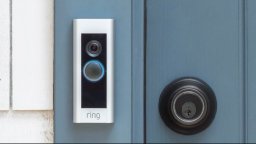
Arcitech Logistics provides professional doorbell installation services throughout the Atlanta metro area, serving Gwinnett County, DeKalb County, Cobb County, Fulton County, and Forsyth County. Since 2015, our certified technicians have been installing traditional wired doorbells, wireless doorbells, and smart video doorbells for homeowners across metro Atlanta. Whether you're upgrading to a modern Ring Video Doorbell, installing a Nest Hello, or replacing a traditional doorbell, our experienced technicians ensure proper wiring connections, transformer verification, chime integration, WiFi setup, and comprehensive app configuration for smart doorbells.

Modern smart video doorbells have revolutionized home security and convenience, allowing homeowners to see, hear, and speak with visitors from anywhere using smartphone apps. Professional installation ensures proper electrical connections, adequate transformer voltage (most video doorbells require 16-24V AC), reliable WiFi connectivity, correct mounting height and angle, and integration with existing chime systems. Our team understands the electrical requirements, network setup, and installation best practices specific to each major doorbell brand.

We serve residential clients throughout the greater Atlanta area, including Lawrenceville, Duluth, Marietta, Alpharetta, Cumming, Roswell, Johns Creek, Sandy Springs, Decatur, Smyrna, Stone Mountain, Tucker, Snellville, Lilburn, Norcross, Peachtree Corners, Sugar Hill, Buford, Suwanee, and Dacula. Our service area covers all major Atlanta metro counties, providing consistent, professional doorbell installation services across the entire region.

Why Choose Arcitech Logistics

Certified Electrical Expertise: Our technicians understand doorbell electrical systems, transformer requirements, voltage testing, and proper wiring techniques. We verify transformer adequacy and upgrade when necessary to ensure reliable doorbell operation.

All Major Brands Installed: We have extensive experience installing Ring, Nest, Arlo, Blink, Eufy, SimpliSafe, Wyze, and traditional doorbells. We know the unique requirements and quirks of each brand, ensuring proper installation every time.

Complete Network Setup: Modern video doorbells are network devices requiring proper WiFi configuration. We ensure strong signal, proper network settings, and reliable connectivity at your door location for consistent performance.

App Configuration Expertise: We don't just install hardware—we set up the app completely, configure all settings including motion zones, notification preferences, and recording options, and provide hands-on training ensuring you're comfortable using all features.

Transformer Upgrades Performed: Many video doorbells fail due to inadequate transformer voltage. We test, verify, and upgrade transformers as needed for reliable operation. Skipping this step is the #1 cause of video doorbell problems.

Chime Integration: We properly integrate video doorbells with existing mechanical or digital chimes, or install plugin chimes, ensuring you get doorbell notifications even when your phone is silenced.

Proper Mounting Height and Angle: Doorbell placement dramatically affects video quality and field of view. We mount at optimal height (48 inches) with proper angle for clear face capture and ideal field of view coverage.

Weatherproof Installation: Atlanta weather requires proper weatherproofing. We seal mounting areas, protect connections, and ensure doorbells handle rain, humidity, and Atlanta's temperature changes reliably.

Smart Home Integration: We integrate doorbells with Alexa, Google Home, and other smart home systems, enabling voice announcements and whole-home integration with your existing smart devices.

Troubleshooting Expertise: When DIY installations fail (poor WiFi, transformer issues, app problems), we diagnose and fix issues quickly using professional knowledge and diagnostic tools. Serving Atlanta since 2015.

Requirements

Before Installation Day:
- Purchase and receive your doorbell (verify all parts included in box)
- Download doorbell manufacturer app on your smartphone (Ring, Nest, Arlo, Blink, Eufy, etc.)
- Create account with doorbell manufacturer before installation day
- Have your WiFi network name and password readily available
- Charge doorbell battery fully if battery-powered model
- Clear area around front door for technician access
- Verify existing doorbell operation if you currently have one
- Note location of electrical breaker panel for power shutoff
- Secure pets during installation appointment
- Be available for app setup and training session

WiFi Requirements Verification:
- Verify WiFi router supports 2.4GHz (most video doorbells require 2.4GHz, not 5GHz only)
- Check WiFi signal strength at front door using smartphone (should have at least 3 bars)
- Consider WiFi extender if signal is weak at door location
- Verify internet upload speed is adequate (minimum 2 Mbps recommended, 5+ Mbps preferred)
- Restart router before installation day if experiencing connectivity issues

Existing Doorbell Information (if applicable):
- Note location of existing chime (listen for sound when doorbell rings to find it)
- Identify chime type: mechanical (ding-dong sound) or digital (electronic chime)
- Verify existing doorbell currently works (if functional)
- Note any existing doorbell issues (dim button light, weak chime, etc.)
- Indicate if you want to keep using existing chime or prefer plugin chime

Smartphone Compatibility:
- Video doorbells require iPhone (iOS 12 or later) or Android phone (Android 8 or later)
- Verify your phone meets minimum operating system requirements
- Ensure phone has adequate storage space for app installation
- Update phone operating system to latest version before installation
- Have app store login credentials available for app download if needed

Services Provided

Ring Video Doorbell Installation: All Ring models including Video Doorbell Pro, Pro 2, Video Doorbell 4, Video Doorbell Plus, Video Doorbell Wired, and Battery models

Nest Hello / Google Doorbell Installation: Google Nest Hello and Google Nest Doorbell (wired and battery) with 24/7 recording capability

Arlo Video Doorbell Installation: Arlo Essential Video Doorbell (wired and wireless models) with local and cloud storage

Blink Video Doorbell Installation: Amazon Blink Video Doorbell wired and wireless versions with Sync Module integration

Eufy Video Doorbell Installation: Eufy Video Doorbell models with local HomeBase storage (no monthly subscription required)

SimpliSafe Video Doorbell Installation: SimpliSafe Video Doorbell Pro integrated with home security system

Traditional Wired Doorbell Installation: Standard wired doorbells with mechanical or electronic chimes and transformer verification

Wireless Doorbell Installation: Battery-operated wireless doorbells with plug-in receivers for homes without existing wiring

Smart Doorbell with Two-Way Audio: Video doorbells allowing real-time conversation with visitors via smartphone app

Doorbell Transformer Upgrade: Upgrading inadequate 8V or 10V transformers to 16-24V required for modern video doorbells

Smart Home Integration Installation: Connecting doorbells to Alexa Echo Show, Google Home Hub, SmartThings, and home automation systems

Dual Doorbell Installation: Installing video doorbells at both front and back doors with unified app monitoring

What's Included

Pre-Installation Assessment: Confirm appointment, verify doorbell model received, discuss existing doorbell configuration, check chime type and location, verify transformer location, confirm WiFi availability at door, check smartphone compatibility, verify mounting surface type, review HOA restrictions, and answer pre-installation questions

Technician Arrival and Inspection: Inspect new doorbell package, verify all hardware included, locate existing doorbell button and chime, test existing doorbell operation, identify transformer location, test transformer voltage with multimeter, verify transformer provides 16-24V AC, check WiFi signal strength at door, inspect door frame mounting surface, and review installation plan with customer

Existing Doorbell Removal: Turn off power at breaker panel, safely remove existing doorbell button, photograph existing wire connections, disconnect wires from old terminals, inspect wire condition, prepare wire ends for new connections, and clean mounting area

Transformer Verification and Upgrade (if needed): Read transformer label to verify output voltage, test actual transformer output, discuss upgrade necessity with customer if voltage is inadequate (most video doorbells require 16-24V), remove old transformer, install new appropriate transformer, connect all wiring, and test new transformer output

Mounting Bracket Installation: Thread doorbell wires through mounting bracket, drill pilot holes as needed (masonry bits for brick), insert anchors for masonry surfaces, position bracket at optimal height (48 inches center), level bracket, secure with mounting screws, and verify bracket stability

Doorbell Wiring Connections: Strip wire insulation as needed, connect wires to doorbell terminals per manufacturer specifications, verify tight secure connections, coil excess wire neatly, install voltage adapter at chime if required by manufacturer, and verify no bare wire is exposed

Doorbell Unit Installation and App Configuration: Attach doorbell unit to mounting bracket, install anti-theft security screw, insert battery if battery-powered, verify power-on LED indicator, connect doorbell to customer's WiFi network, complete app setup and account configuration, name doorbell device, configure motion zones, set notification preferences, enable two-way audio, and configure smart home integration if requested

Chime Integration and Testing: Verify existing chime operation with new doorbell, install voltage adapter if required, test that chime activates when button pressed, install plugin chime if preferred or required, configure chime sound and volume, test motion detection alerts, verify two-way audio quality, test night vision, and confirm all features working

Customer Training: Demonstrate live video viewing, explain how to answer doorbell from app, show notification types (button press vs. motion), demonstrate video history access, show motion zone adjustment, explain recording options and cloud storage subscription, demonstrate smart home integration features, explain battery maintenance, and answer all questions

Final Quality Checks and Cleanup: Verify doorbell is level and securely mounted, confirm anti-theft screw is installed, verify all wires are concealed, apply weatherproof caulk if needed, clean doorbell and mounting area, remove packaging and debris, perform final operational test, verify WiFi connection stability, provide doorbell manual and warranty information, and provide Arcitech Logistics contact for future service needs

Specifications & Safety

Transformer Requirements:
- Output Voltage: 16-24V AC (most video doorbells require minimum 16V, some require 24V)
- Transformer VA Rating: Minimum 10VA recommended (20VA preferred for Ring Pro, Nest Hello)
- Primary Input: 120V AC household current
- Common Transformer Voltage Failures: 8V and 10V transformers inadequate for modern video doorbells

Video Doorbell Power Requirements:
- Hardwired Doorbells: 16-24V AC from doorbell transformer
- Battery Doorbells: Integrated rechargeable lithium battery (typically 6,000-10,000 mAh)
- Hybrid Models: Compatible with both battery and wired power simultaneously
- Typical Power Consumption: 1-5W during standby, up to 15W during active video streaming

WiFi Requirements:
- Frequency Band: 2.4GHz (required by most doorbells); some newer models also support 5GHz
- Minimum WiFi Signal: -65 dBm or stronger at doorbell location (3+ bars on smartphone)
- Minimum Internet Upload Speed: 2 Mbps recommended; 5+ Mbps preferred for reliable video
- Protocol: 802.11 b/g/n for 2.4GHz; 802.11 a/n/ac for 5GHz (model dependent)

Video Specifications (Typical Ranges by Model):
- Resolution: 1080p HD (most models); 1536p HD+ (Ring Pro 2); 2K (some Eufy models)
- Field of View: 155-160 degrees horizontal (most video doorbells)
- Frame Rate: 15-30 fps depending on model and network conditions
- Night Vision: Infrared LED illuminators, effective range 10-20 feet
- HDR: Available on select models for improved highlight/shadow detail

Audio Specifications:
- Two-Way Audio: Full-duplex for simultaneous speaking and listening
- Noise Cancellation: Built-in on most current models
- Microphone: Omnidirectional with background noise reduction
- Speaker Output: Sufficient for normal conversation at doorstep

Mounting Specifications:
- Recommended Mounting Height: 48 inches to center of doorbell (standard)
- Maximum Height: 60 inches (higher reduces camera view of person's face)
- Minimum Height: 36 inches
- Optimal Camera Angle: Slightly downward 15-20 degrees toward walkway approach
- Weatherproof Rating: IP65 or IP66 (resistant to rain, dust, and humidity)
- Operating Temperature Range: -4°F to 120°F (-20°C to 48°C) typical
- Weight: 0.3-0.8 lbs depending on model (heavier for wired models with internal components)

Doorbell Wire Specifications:
- Standard Doorbell Wire: 18-22 AWG (18 gauge preferred for longer runs)
- Maximum Wire Run Length: Up to 100 feet for most video doorbells
- Wire Type: Solid or stranded copper; two-conductor bell wire
- Voltage at Doorbell: Should measure 16-24V AC when connected to transformer

Chime Compatibility:
- Mechanical Chimes: Compatible with most video doorbells (may require voltage adapter)
- Digital/Electronic Chimes: Often incompatible; plugin chime recommended
- Plugin Chimes: Work with any WiFi-connected video doorbell via app pairing
- Chime Power: Plugin chimes use standard 120V outlet power

Additional Charges

Transformer Upgrade or Replacement - $75-$125: If existing transformer provides inadequate voltage for video doorbell (most need 16-24V), we'll upgrade to compatible transformer. Includes transformer, electrical work, wire connections, and testing. Essential for Ring Pro, Nest Hello, and most hardwired video doorbells.

New Doorbell Wiring Installation - $125-$275: Running new doorbell wire from transformer to front door where no wiring currently exists. Price varies based on distance, wall access (easy vs. difficult), and whether exterior or interior routing. Includes wire, routing labor, and connections.

Chime Installation or Replacement - $45-$95: Installing new mechanical chime if none exists, or replacing incompatible chime. Includes chime unit, mounting, wiring, and testing. Some video doorbells require specific chime types or voltage adapters.

Plugin Chime Purchase and Setup - $35-$55: For doorbells that don't support existing chime or customer prefers plugin chime (Ring Chime, Arlo Chime). Includes chime device, app pairing, volume adjustment, and testing.

WiFi Extender Installation - $95-$145: If WiFi signal at front door is inadequate for reliable doorbell operation, we can install WiFi range extender. Includes extender device, setup, network configuration, and signal testing.

Exterior Wire Conduit Installation - $85-$155: If doorbell wiring must run exposed on exterior, we install weatherproof conduit protecting wires. Price depends on length of run and number of bends. Includes conduit, fittings, mounting, and wire fishing.

Brick or Stone Mounting - $45-$75: Mounting video doorbell to brick, stone, or concrete requires masonry drill bits, special anchors, and additional labor time. Includes appropriate mounting hardware and professional masonry drilling.

Smart Home Integration Setup - $75-$125: Comprehensive integration with Alexa, Google Home, SmartThings, or other smart home systems. Includes hub configuration, automation setup, voice command programming, and testing with other smart devices.

Doorbell Angle Wedge Installation - $25-$40: For doorbells mounted on wall perpendicular to walkway (common on covered porches), angle wedge aims camera toward walkway. Includes wedge mounting and repositioning doorbell.

Second Doorbell Installation (Discount Rate) - 30% off standard installation: When installing doorbell at both front and rear doors in same visit, second installation receives significant discount. Each doorbell still requires its own wiring and transformer power.

Commercial Doorbell System - Custom Quote: Business installations, multi-unit properties, or integration with access control systems quoted after site assessment based on specific requirements, number of doors, and integration complexity.

Troubleshooting and Repair - $75-$150 per hour: Diagnosing and repairing existing doorbell installations that aren't working properly. Common issues: weak transformer, poor WiFi, incorrect wiring, or app configuration problems.

After-Hours or Weekend Installation - 25-50% surcharge: Installations requested outside normal business hours (evenings after 6pm, weekends, holidays) charged at premium rate.

Our Professional Process

Phase 1 - Pre-Installation Assessment (Steps 1-20): Contact customer to confirm appointment, verify doorbell model received and all parts included, discuss existing doorbell configuration (wired vs. no existing doorbell), ask about chime location and type (mechanical vs. digital), verify transformer location if existing doorbell present, discuss WiFi network availability at front door, confirm smartphone compatibility with doorbell brand, ask about desired chime behavior, verify mounting surface type, discuss mounting height preferences (typically 48 inches), check if doorbell will be exposed to weather, verify adequate WiFi signal strength, discuss smart home integration requirements, confirm customer has created manufacturer account, verify power shutoff access at breaker panel, discuss HOA restrictions on doorbell cameras, and answer all pre-installation questions.

Phase 2 - Technician Arrival and Initial Inspection (Steps 21-40): Technician arrives within scheduled window, reviews installation plan with customer, inspects new doorbell package for completeness, verifies all mounting hardware included, locates existing doorbell button and chime box, identifies transformer location, tests transformer output voltage with multimeter, verifies transformer voltage is adequate (16-24V typically required), checks WiFi signal strength at door using smartphone, inspects door frame and wall for proper mounting surface, measures and marks optimal mounting height, verifies doorbell field of view captures desired area, reviews special considerations with customer, and obtains customer approval to proceed.

Phase 3 - Existing Doorbell Removal (Steps 41-55): Turns off power to doorbell circuit at breaker panel, places warning sign on breaker, verifies power is off, removes existing doorbell button screws, photographs existing wire connections, notes wire colors and connection points, carefully disconnects wires from old terminals, inspects wire condition (corrosion, fraying), strips wire ends if needed, inspects mounting holes, removes old mounting hardware, and cleans mounting area.

Phase 4 - Transformer Verification and Upgrade (Steps 56-75): Locates existing transformer, reads label to verify output voltage, determines if upgrade is required for video doorbell, discusses upgrade necessity with customer, turns off power to transformer circuit, removes old transformer, selects appropriate replacement (16-24V, 10VA or higher), mounts new transformer, connects 120V wiring, connects low-voltage doorbell wires, and tests new transformer output (should read 16-24V AC).

Phase 5 - Mounting Bracket Installation (Steps 76-95): Unpacks new video doorbell and components, threads doorbell wires through mounting bracket, drills pilot holes using masonry bit if needed, inserts plastic anchors for brick/masonry, positions mounting bracket at 48-inch center height, levels bracket, marks screw hole locations, drills pilot holes, mounts bracket, tightens mounting screws securely, verifies bracket stability, and applies weatherproof caulk if needed for exposed locations.

Phase 6 - Wiring Connections (Steps 96-115): Strips 1/2 inch insulation from wire ends, identifies doorbell wiring terminals per manufacturer design, connects wires to terminals securely (Ring: screw terminals; Nest: push terminals), gently tugs each wire to verify connection, neatly coils excess wire, installs voltage adapter at chime if required, connects adapter wires to chime terminals, and closes chime box cover.

Phase 7 - Doorbell Unit Installation and App Configuration (Steps 116-145): Attaches doorbell unit to mounting bracket, installs anti-theft security screw, inserts battery if battery-powered, powers on doorbell (LED illuminates), restores breaker power, downloads doorbell manufacturer app, opens app and selects "Add New Device", connects doorbell to WiFi network using customer's password, confirms successful WiFi connection, names doorbell ("Front Door"), sets motion zones, adjusts motion sensitivity, configures notification preferences, enables two-way audio, configures night vision, links to smart home systems if requested, and tests doorbell button press.

Phase 8 - Chime Integration and Final Testing (Steps 146-165): Verifies existing chime functionality with new doorbell, installs plugin chime if required or preferred, pairs plugin chime with doorbell app, tests all chime sounds, tests motion detection, verifies motion notifications received within 3-5 seconds, tests two-way audio quality, tests night vision, and confirms all features working as expected.

Phase 9 - Customer Training (Steps 166-185): Provides hands-on training on doorbell app operation, demonstrates live video viewing, shows how to answer doorbell from smartphone, explains notification types, demonstrates video history access, shows how to save and share video clips, demonstrates motion zone adjustment, explains video recording options, shows how to add additional users, explains cloud storage options, provides written documentation, and answers all customer questions.

Phase 10 - Final Quality Checks and Cleanup (Steps 186-200): Verifies doorbell is securely mounted and level, confirms anti-theft screw is installed, verifies no wires are exposed, applies additional weatherproof caulk if needed, cleans doorbell and mounting area, removes all packaging, tests doorbell operation one final time, verifies WiFi connection stability, checks battery level, verifies app notifications are reliable, provides user manual and warranty information, and provides Arcitech Logistics contact for future service needs.

Preparation

Doorbell Purchase and App Setup:
- Purchase your doorbell and verify all parts are included in the package
- Download the doorbell manufacturer's smartphone app (Ring, Nest, Google Home, Arlo, Blink, Eufy, or other brand-specific app)
- Create your account with the doorbell manufacturer before installation day
- Have your WiFi network name (SSID) and password written down and readily available
- If battery-powered doorbell, fully charge the battery using included cable before installation

Home Preparation:
- Clear area around front door for technician access and workspace
- Secure pets in another area of the home during the installation appointment
- Be available to participate in app setup and receive hands-on training at end of installation
- Note the location of your electrical breaker panel for power shutoff access
- If you have an existing doorbell, note if it currently works or not

WiFi Verification:
- Test WiFi signal strength on your smartphone at the front door location
- Verify router supports 2.4GHz band (most video doorbells require 2.4GHz)
- Consider purchasing a WiFi extender if signal is weak at door (we can also install one)
- Check your internet plan's upload speed (minimum 2 Mbps, 5+ Mbps recommended)

Existing Doorbell Information:
- Listen for where the chime sound comes from when doorbell button is pressed
- Note whether chime is mechanical (physical ding-dong sound) or digital/electronic
- Let technician know if existing doorbell has any issues (dim light, weak ring, etc.)
- Decide whether you want to keep using existing chime or prefer a plugin chime

Additional Considerations:
- Review your HOA guidelines if applicable regarding doorbell cameras
- Decide on smart home integration preferences (Alexa, Google Home, etc.)
- Consider where you want motion detection zones configured (driveway, walkway, porch)
- Have your phone fully charged for app setup during installation

Testing & Quality Assurance

Transformer Voltage Testing: Use digital multimeter to test existing transformer output voltage (AC setting). Verify output reads 16-24V AC as required by most video doorbells. Test under load (with doorbell connected) not just open circuit. If voltage reads below 14V under load, transformer upgrade is required. Document transformer voltage before and after any replacement.

WiFi Signal Strength Testing: Use smartphone WiFi analyzer app or doorbell manufacturer's signal strength indicator to verify adequate WiFi signal at door location. Minimum -65 dBm signal strength recommended for reliable video doorbell operation. Test during installation and after doorbell is mounted (device body can affect signal). Consider WiFi extender if signal is below minimum threshold.

Doorbell Button Function Test: Press doorbell button and verify LED indicator illuminates properly indicating adequate power. Confirm button press triggers notification on customer's smartphone app within 3-5 seconds. Verify doorbell button activates existing chime or plugin chime if configured. Test button multiple times to confirm consistent operation.

Two-Way Audio Test: Initiate live video from app while someone stands at door. Test audio in both directions: speak from smartphone app and verify person at door can hear clearly. Person at door speaks into doorbell microphone and verify audio is clear in app. Test at normal conversation volume. Adjust microphone or speaker volume settings if needed.

Motion Detection Test: Walk in front of doorbell at normal approach distance (10-15 feet). Verify motion notification is received on smartphone within 3-5 seconds. Test from multiple angles to verify motion zone coverage is correct. Test that motion in excluded zones (sidewalk, street) does NOT trigger alerts. Adjust motion sensitivity if false alerts occur or legitimate motion is missed.

Video Quality Test: Review live video stream in daylight conditions. Verify image is clear, properly focused, and correct field of view covers walkway and door area. Check that face recognition is possible at typical approaching visitor distance. Verify video frame rate appears smooth (not choppy).

Night Vision Test: Cover camera lens briefly or test in low-light conditions to trigger night vision mode. Verify infrared LEDs activate and image switches to black-and-white infrared mode. Confirm night vision provides adequate visibility of door area. Check there are no bright reflective surfaces causing image washout.

App Notification Test: Verify push notifications are properly configured on customer's smartphone. Test with phone ringer off to confirm notifications still appear. If customer has multiple smartphones, verify all family members' phones receive notifications. Confirm notification shows snapshot image preview of visitor.

Chime Integration Test: If using existing mechanical or digital chime, verify chime activates when doorbell button pressed. Check chime volume is audible from main living areas. If using plugin chime, verify it rings when button pressed and volume is set to customer's preference. Confirm chime and app notification both work simultaneously.

Smart Home Integration Test: If doorbell linked to Alexa or Google Home, test voice command to view doorbell ("Alexa, show front door"). Verify doorbell video appears on Echo Show or Google Nest Hub display when button pressed. Test any automation routines configured (lights turning on with motion, voice announcements, etc.). Verify routines trigger reliably.

Cloud Recording Verification: If subscription is active, trigger several motion events and press doorbell button. After brief delay, open app video history and verify events are recorded and playable. Confirm video timestamps are correct. Verify video quality in recordings matches expected quality for subscription tier.

Final Operational Test: Perform complete end-to-end test simulating real visitor scenario: approach doorbell, press button, verify notification received, open live view, conduct two-way audio conversation, verify recording saved. Customer confirms satisfaction with all doorbell functions before installation is considered complete.

Service Areas

Gwinnett County: Lawrenceville, Duluth, Norcross, Lilburn, Snellville, Grayson, Loganville, Dacula, Buford, Suwanee, Sugar Hill, Peachtree Corners, Berkeley Lake, Rest Haven, Braselton (partial)

DeKalb County: Decatur, Tucker, Stone Mountain, Clarkston, Avondale Estates, Chamblee, Doraville, Dunwoody, Brookhaven, Lithonia, Pine Lake, Stonecrest

Cobb County: Marietta, Smyrna, Kennesaw, Acworth, Austell, Powder Springs, Mableton, Fair Oaks, Vinings

Fulton County: Atlanta, Alpharetta, Roswell, Sandy Springs, Johns Creek, Milton, East Point, College Park, Fairburn, Hapeville, Mountain Park, Union City

Forsyth County: Cumming

Coverage Details

Arcitech Logistics provides professional doorbell installation services throughout the greater Atlanta metropolitan area, covering five counties with consistent, reliable service since 2015.

Gwinnett County (Primary Service Area): Lawrenceville (headquarters), Duluth, Norcross, Lilburn, Snellville, Grayson, Loganville, Dacula, Buford, Suwanee, Sugar Hill, Peachtree Corners, Berkeley Lake, Rest Haven, Braselton (partial), Auburn, Winder (partial)

DeKalb County: Decatur, Tucker, Stone Mountain, Clarkston, Avondale Estates, Chamblee, Doraville, Dunwoody, Brookhaven, Lithonia, Pine Lake, Stonecrest, Conyers (partial)

Cobb County: Marietta, Smyrna, Kennesaw, Acworth, Austell, Powder Springs, Mableton, Fair Oaks, Vinings, Hiram (partial)

Fulton County: Atlanta (all neighborhoods), Alpharetta, Roswell, Sandy Springs, Johns Creek, Milton, East Point, College Park, Fairburn, Hapeville, Mountain Park, Union City, Palmetto (partial)

Forsyth County: Cumming, Gainesville (partial), Dawsonville (partial)

Service Radius: Approximately 35-40 miles from Lawrenceville, Georgia headquarters

Typical Service Hours: Monday through Saturday, 8:00 AM - 6:00 PM
Same-Day and Next-Day Appointments: Often available based on schedule
After-Hours Service: Available with premium surcharge (25-50%)
Weekend Service: Saturday appointments available; Sunday by special arrangement

Travel Fee: No travel fee for locations within primary 5-county service area. Locations outside standard service area may incur travel fee—contact us to verify coverage for your specific location.

Commercial Service: We service commercial properties, rental properties, multi-unit buildings, and HOA common areas throughout our service territory. Commercial doorbell and access control systems quoted after site assessment.

Frequently Asked Questions

Q: Do I need existing doorbell wiring to install a video doorbell?
A: It depends on the doorbell model. Hardwired video doorbells (Ring Pro, Nest Hello, Ring Video Doorbell Wired) require existing doorbell wiring or new wiring installation. They connect to your home's low-voltage doorbell wiring (typically 16-24V from transformer) for continuous power and never need battery charging. Battery-powered video doorbells (Ring Video Doorbell 3, 4, Arlo Essential Wireless, Blink) don't require any wiring—they operate on rechargeable batteries needing recharge every 3-6 months. Hybrid models (Ring Video Doorbell 4, Ring Plus) work with either battery alone OR wired with battery backup. If you have existing doorbell wiring, hardwired or hybrid models are recommended for best performance.

Q: What voltage transformer do I need for a video doorbell?
A: Most video doorbells require 16-24V AC transformer. Ring doorbells typically need 16V minimum (24V preferred for Ring Pro models). Nest Hello requires 16-24V. Many older homes have 8V or 10V transformers powering traditional doorbells—these are inadequate for video doorbells and cause problems like doorbell rebooting, not charging properly, or failing to ring chime. We test your existing transformer output during installation and upgrade if voltage is insufficient ($75-$125 including new transformer, labor, and testing). Inadequate transformer voltage is the #1 cause of video doorbell problems.

Q: Will a video doorbell work with my existing chime?
A: Usually yes, but it depends on chime type and doorbell model. Mechanical chimes (traditional ding-dong with physical hammers) work with most video doorbells but may require a voltage adapter or resistor installed at chime. Digital chimes (electronic chimes playing musical tones) often don't work well with video doorbells. For digital chimes, a plugin chime (Ring Chime, Arlo Chime) is a better alternative ($35-$55). If you have no existing chime, we can install a plugin chime that works wirelessly. We test chime operation during installation and configure to your preference.

Q: How much bandwidth does a video doorbell use?
A: During live viewing, expect 1-2 Mbps upload bandwidth. During motion events, brief video clips upload using 1-2 Mbps. For continuous recording (Nest Hello 24/7), expect 200-400 MB upload per hour. Your internet upload speed matters most—check at speedtest.net. Most Atlanta internet plans provide 10-35 Mbps upload, adequate for 1-3 video doorbells. WiFi signal strength at door location is often more critical than total bandwidth—weak WiFi causes video quality issues.

Q: Can I install a video doorbell in an apartment or rental?
A: Yes, but consider these factors: Wired installation requires landlord permission since it involves electrical connections and drilling. Battery-powered doorbells are better for rentals—no wiring required, easy to remove when moving. HOA or condo associations may have rules about doorbell cameras—check before installation. Battery-powered video doorbells (Ring 3, Ring 4, Arlo, Blink) are ideal for apartments—easy installation with minimal wall impact and removable when you relocate.

Q: How long do video doorbell batteries last?
A: Battery life varies based on usage: 3-6 months typical with default settings and moderate activity (10-20 events per day). Factors draining battery faster: cold weather, high motion sensitivity, busy location, frequent live viewing, weak WiFi. Purchase spare battery pack ($30 for Ring) to swap instantly for zero downtime. Solar charging panels ($50) available for some models that extend battery life significantly. Or go hardwired—hybrid models like Ring 4 can be wired for continuous power.

Q: Will video doorbell work if internet or WiFi is down?
A: Cloud-based doorbells (Ring, Nest, Arlo, Blink) require internet to send notifications and store video. During internet outage: you won't receive alerts or view video remotely, cloud recording stops. However, if wired, doorbell button still triggers chime locally. Some models record to local buffer for later upload when connection restores. Eufy doorbells record to HomeBase local storage even without internet. For critical security needs, professional security systems with cellular backup are more reliable.

Q: Can video doorbell footage be used as evidence for police?
A: Yes, video doorbell footage is admissible evidence and frequently used by law enforcement. 1080p+ video provides clear detail of faces, clothing, and vehicles. Common uses include package theft, vehicle break-ins, trespassing, vandalism, and suspicious activity. Download specific video clips from the app to share via email or upload to police portals. Ring has a formal "Request Video" system for police. In Georgia, you can legally record video of anyone on your property or visible from your property without consent. Clearly visible doorbell cameras also deter crime.

Q: How do I view my doorbell when someone rings it?
A: When someone presses your doorbell button, you receive an instant push notification on your smartphone (typically within 3-5 seconds) with a snapshot image. Tap notification to open the doorbell app and see live video. Two-way audio lets you speak to visitors through the app even when you're not home. On Amazon Echo Show or Google Nest Hub displays, the video feed automatically appears when button pressed. Multiple family members can install the app and receive notifications. If you miss a notification, recorded video (with subscription) lets you review who visited.

Q: Do video doorbells record 24/7 or only when motion is detected?
A: Recording mode depends on the model and subscription: Motion-activated recording (standard for most) only records when motion detected or button pressed—minimal storage, longer battery life. 24/7 continuous recording (Nest Hello with subscription, some Arlo plans) records constantly but requires subscription ($6-$30/month) and hardwired power. Ring requires subscription ($4/month per device or $10/month unlimited) for video playback—without it, only live alerts available. Eufy doorbells record motion events to local HomeBase storage free forever with no subscription required.

Q: Can video doorbells handle Atlanta's summer heat and storms?
A: Yes, quality video doorbells are designed for outdoor use including Atlanta's hot, humid summers. Most operate in -4°F to 120°F range. IP65/IP66 rated (water and dust resistant) handles heavy rain and humidity. Mount under eave or overhang when possible for best protection. Lightning: use whole-house surge protector for maximum protection. Periodically clean lens with microfiber cloth to remove pollen, dirt, and spider webs that affect video quality. Overall, video doorbells perform reliably in Atlanta's climate.

Q: Will my doorbell work with Alexa or Google Home?
A: Most major video doorbells integrate with smart home systems: Ring + Alexa (native, Amazon owns Ring): announce doorbell presses, show video on Echo Show, voice control. Nest Hello + Google Home (native): display video on Google Nest Hub, voice control, doorbell announcements. Arlo works with both Alexa and Google Home. Eufy and Blink (Amazon owns Blink) also support Alexa. We can perform smart home integration during installation ($75-$125 for comprehensive setup with automation programming including lights activating on motion detection or voice announcements).

Q: What's the difference between Ring doorbell models?
A: Ring Video Doorbell (3rd Gen, ~$100): Battery-powered, 1080p, basic motion detection. Ring Video Doorbell 4 (~$200): Better battery, pre-roll recording (captures 4 seconds before motion), enhanced WiFi. Ring Video Doorbell Plus (~$180): Head-to-toe video, improved pre-roll, better battery. Ring Video Doorbell Pro (~$250): Hardwired only, 1536p video, customizable motion zones. Ring Video Doorbell Pro 2 (~$280): 1536p HD+, 3D motion detection, bird's eye view, top flagship model. Ring Video Doorbell Wired (~$65): Budget wired-only model, 1080p, requires existing wiring. All Ring models require Ring Protect subscription ($4/month) for video recording and playback.

Q: Do I need a subscription for video doorbell recording?
A: Depends on the brand: Ring requires Ring Protect subscription ($4/month per device or $10/month all devices) for video recording and playback. Nest Hello requires Nest Aware subscription ($6-$12/month) for any recording. Arlo: subscription optional, basic features work without it. Blink: free local storage to USB drive via Sync Module (no subscription required for basic). Eufy: NO subscription required—records to HomeBase local storage free forever. If avoiding monthly fees is priority, Eufy doorbells are the best option. Consider: $4/month Ring subscription equals $240 over 5 years, sometimes exceeding the doorbell cost itself.

Q: How do I recharge the battery on a battery-powered doorbell?
A: Press the release button on the doorbell to slide out the battery pack. Connect to included charging cable and plug into any USB power adapter (phone charger works). Charge indicator LED shows status. Charging time: 4-10 hours depending on depletion level—charge overnight for convenience. Battery life between charges: 3-6 months typical. Purchase spare battery pack ($30 for Ring) to swap instantly—zero downtime. Ring and some other brands offer solar charging panels ($50) that mount near doorbell providing trickle charge to significantly extend battery life, particularly helpful in Atlanta's sunny climate.

Service Areas

We provide Professional Doorbell Installation in Atlanta Metro Area throughout the Atlanta Metro area including:

Gwinnett County

  • Lawrenceville
  • Duluth
  • Suwanee
  • Buford
  • Norcross
  • Lilburn
  • Snellville

DeKalb County

  • Decatur
  • Dunwoody
  • Tucker
  • Stone Mountain
  • Chamblee
  • Brookhaven

Cobb County

  • Marietta
  • Smyrna
  • Kennesaw
  • Acworth
  • Powder Springs
  • Austell

Fulton County

  • Atlanta
  • Alpharetta
  • Sandy Springs
  • Roswell
  • Johns Creek
  • Milton

Forsyth County

  • Cumming
  • Suwanee

Contact Information

Ready to enhance your home security with a professionally installed video doorbell? Contact Arcitech Logistics for expert doorbell installation throughout the Atlanta metro area.

Phone: (678) 656-9246
Email: arcitechlogistics@gmail.com
Website: arcitechlogistics.com

Service Hours: Monday - Saturday, 8:00 AM - 6:00 PM
Same-day appointments often available

Serving Gwinnett County, DeKalb County, Cobb County, Fulton County, and Forsyth County since 2015. Licensed, insured, and trusted by thousands of Atlanta homeowners.

Call now to schedule your professional doorbell installation and enjoy enhanced home security and convenience!

Next Steps

After your doorbell installation is complete, follow these steps to get the most from your new doorbell:

Immediate Post-Installation (First 24 Hours):
1. Test all doorbell features one more time: button press, motion detection, two-way audio, and night vision
2. Adjust motion zones in the app if you notice any false alerts from traffic or neighbors
3. Set up additional app users for family members who should receive doorbell notifications
4. If battery-powered, note current battery level and purchase spare battery pack for when charging is needed
5. Save Arcitech Logistics contact information for any questions: (678) 656-9246

App and Settings Optimization (First Week):
6. Monitor notification frequency—if receiving too many false motion alerts, reduce motion sensitivity
7. Adjust motion zones to precisely cover desired areas (walkway, driveway, porch steps)
8. Configure quiet hours in app if you don't want notifications during sleeping hours
9. Review privacy zone settings if camera field of view includes neighboring property
10. Set up smart home integrations if not completed during installation (Alexa, Google Home routines)

Ongoing Maintenance:
11. For battery doorbells: Monitor battery level in app and recharge when it drops to 20% or below
12. Clean doorbell camera lens monthly with soft microfiber cloth—pollen, spiders, and dirt collect on outdoor cameras
13. Check doorbell mounting screws seasonally—thermal expansion/contraction can loosen screws over time
14. Test doorbell operation after any WiFi router changes or internet service provider upgrades
15. If you receive notification that doorbell is offline, check WiFi signal strength and router operation

Cloud Storage and Recording:
16. If you want to review recorded video (beyond live view), activate manufacturer's subscription plan (Ring Protect, Nest Aware, etc.)
17. Download important video clips immediately if you need to preserve them for police or insurance
18. For Ring customers: Review Neighbors app settings and decide if you want to participate in community alert network
19. For Eufy customers: Verify HomeBase local storage is functioning properly (no subscription required)

Seasonal Reminders:
20. Before summer: Verify doorbell is getting adequate airflow and not overheating in direct sunlight
21. Before winter: For battery doorbells, note that cold temperatures reduce battery performance; more frequent charging may be needed
22. After severe weather: Inspect doorbell mounting and weatherproofing for any damage
23. Annually: Review and update motion zone configurations as landscaping or neighborhood changes affect detection areas

Contact and Support:
24. For any installation-related issues within 90 days: Contact Arcitech Logistics at (678) 656-9246 (90-day workmanship warranty)
25. For doorbell app or cloud service issues: Contact manufacturer directly (Ring support: 1-800-656-1918; Google Nest: 1-844-400-0297; Arlo: 1-800-204-8168)
26. For transformer or electrical issues discovered later: Contact Arcitech Logistics for professional electrical service

Ready to Book?

Call or text us — we're available Mon–Sat, 8am–6pm.

(678) 656-9246
arcitechlogistics@gmail.com

Business Hours

  • Monday - Friday:
  • Saturday:
  • Sunday: Closed

Emergency Service Available: Call (678) 656-9246

Why Choose Arcitech Logistics

Licensed & Insured Fully certified technicians
Same-Day Service Available across Atlanta Metro
10+ Years Experience Established since 2015
Free Estimates No hidden fees

Important Information

Thank you for choosing Arcitech Logistics for your doorbell installation!

Professional doorbell installation ensures proper electrical connections, adequate transformer power, optimal mounting position, and reliable operation of your smart video doorbell.

Before installation:
- Download your doorbell's app (Ring, Nest, Arlo, Blink, Eufy, etc.)
- Create an account with the manufacturer
- Have your WiFi network name and password ready
- Fully charge battery if battery-powered model
- Clear area around front door

During installation:
- We'll test your transformer voltage and upgrade if needed
- Doorbell will be mounted at optimal height (48 inches)
- All wiring will be secure and weatherproof
- WiFi and app will be fully configured
- Complete hands-on training provided

After installation:
- Test all doorbell features (button press, motion, video, audio)
- Adjust motion zones to eliminate false alerts
- Charge spare battery if battery-powered model
- Contact us immediately if any issues arise
- Enjoy secure, convenient doorbell operation!

Questions before your appointment? Call us at (678) 656-9246

We look forward to installing your video doorbell with professional expertise!

Arcitech Logistics
Doorbell Installation Experts Since 2015

Ready to Schedule Your Professional Doorbell Installation in Atlanta Metro Area?

Same-day service available across the Atlanta Metro area.
Licensed & insured — satisfaction guaranteed.

(678) 656-9246
— or —
arcitechlogistics@gmail.com